Wednesday, May 23, 2012

Airtel Free Internet 3G Again UDP VPN Unlimited Trick June 2012

Airtel Free Internet 3G Again UDP VPN Unlimited Trick May-June 2012 Working in Delhi, Up, North India Confirmed!

Trick is Fully Tested By Me and Working 100% , I tried to Download 500 MB File and It Downloaded Speedly Without Any Error.

Only You Need To Have a Small 3G Data Pack, in Order to Work This Trick.

I Tried it On Rs.99 3G Pack (200MB) and Only 0.04mb Deducts Per Session  ;D ;D ;D Means You Can Have Unlimited 3G Data.

Requirements: Any 3G Data Pack OR Small Balance In Phone.

What To Do?

Just Download HexVpn V1.1 and Connect Hex VPN via Any Server.

Download: I was Not Able to Attach Here, Because Max. Attachment Size is 5MB .

Download Via Mediafire http://www.mediafire.com/?rl4naf45l9hwl6d (7 MB)

Password: ttf

IMPORTANT NOTE:Users Using Windows Vista OR 7 Should Run Hex VPN As an Administrator

Try In Your State and Reply. Do Share Your Problems Regarding This Trick :)  ;)

Airtel Free 4G 3G GPRS Working trick through IP Proxy Server

We are Back again with new airtel telecom internet trick for 2G (GPRS), 3G/3.5G(hsdpa/utms), 4G users. This is working trick tested by me with airtel west bengal sim with 0 balance (Below 10paisa) with airtel 3G activated sim and i’m still getting 7.2mbps browsing speed and upto 350kbps downloading speed. Airtel is vigorously blocking all the proxies as we know. So make the use of these awesome Airtel proxies before getting banned.Setup Airtel Free Internet With This Proxy Trick:Create new configuration setting as given below- (Try underline 1st)*. Account name : Invowel.com*. Home Page : 121.241.248.6 or 202.46.201.112*. Proxy : songslover.com or stevebasu.net or 64.31.52.181 or 208.77.23.4*. Port as 80Save the settings as default. And open with default mobile browsers.Note: Always try this trick at minimum balance. I will suggest you to buy new airtel sim to testing any trick. The reason is airtel telecom may block This proxy anytime. and second thing isnever enter your secure details with proxies like this. For example never login to your bank account with free proxy. (Proxy service provider is a 3rd party service provider and may copy your details)

How to Block Porn Adult Websites without using Software

Online porn is just increasing day by day, people are enjoying these stuff but still many parent's are little worried about their children getting evolved in all these activities in really early age. Well I remember that when I started browsing there were no restrictions as my parents were not knowing much about this internet but now parents are little aware about these stuff and they continuously trying to add some restriction in their children's daily internet browsing schedule.
Well I think restricting is not a good way to stop your children from browsing these kind of stuff but you need to have much more Intel on how these things can be taken down and may be stopped at some point.
Well these are many software's available that claims to work and they do work like I listened about the Net Nanny and many others but today I will show a manual and free way to block all the porn sites on any particular computer. This involves in changing the DNS to Open DNS that automatically blocks all the bad websites.
  1. network-sharing-tabOpen Control Panel and click on Network and Sharing Center.
  2. Now on this page just click on the connection you arewireless-network-connectionconnected to and that will popup the dialog with many options.
  3. Now just click on the Properties Tab and you will see some options double click onproperties-tabthe Internet Protocol version 4 and at the bottom choose Use the Following DNS Servers and add below DNS Server numbers to it.208.67.222.123
    208.67.220.123
  4. dns-server-optionNow when you will add above DNS Server number it will look something like right image, so now this is it just click on Apply and OK.
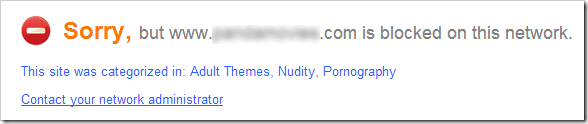

  5. Now your DNS Servers are changed and now just try to open any adult website, it will be automatically blocked. And you will see message like below.
blocked-porn-sites
So now it not a full proof protection for your children's or your friends, but still if they do not know much about these technical stuff except opening Google and searching than it will work seriously fine. So do share your thoughts through below comments on how you like this post and share it will your friends too.

Sunday, May 20, 2012

How to Disable Dragging in Blogger Website


Blogger logoDisabling Drag option can come handy when you want to protect your unique work from the robotic copiers and others whom you do not trust. So with this simple hack you can disable mouse dragging so person will not able to drag text and images on your website hence giving no chance for copying well he may get some alternate way to copy out the content but still this will l he may get some alternate way to copy out the content but still this will protect your blog in a great way and many of our readers may have seen this thing happen onHackingUniversity few days ago.So now if you are in need of applying this on your blog, well tut is below and can be followed easily.1. Go to Blogger.com and Sign in to your account, now choose your blog.2. Navigate to Template > Edit HTML Section and hit Proceed.3. Now press Ctrl + F to open the search feature and than search for <body tag.ondragstart='return false' onselectstart='return false'<body tag blogger5. Now just click save template and click view Blog and check out if this small code is making wonders or not well it works perfect as I was using this same thing to protect my blog from scrappers but due to many request to disable it from my blog I did it now but it’s a great way to protect your blog so have fun :)4. Now you will see <body with a something more code after it so you have to paste the below code right after it which will make code look like in the image below.

Tuesday, May 15, 2012

How to Block Access to Certain Websites using Easy Tricks


Blocking access to some websites can be due to many reasons, from malware spreading sites to some sites exclusive popping up those porn sites. Well it's really important for you to know exactly how blocking works and how you can block online websites for security reasons. So I have gathered few easy trick which can help you in blocking your websites.

#1. Block Website's using Internet Explorer

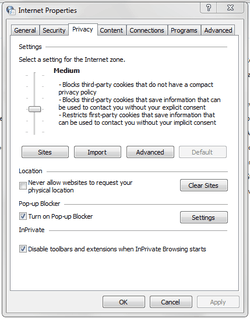
internet-privacy-optionsInternet option in your control panel provides you with options to extend your security and block access to certain websites. You can either slide the slider for automatic websites blocking according to their repo level or you can specify your websites manually.
  1. Open Control Panel > internet Options.
  2. Now switch to the Privacy Tab and you can slide the slider and read what exactly it does on that particular level, or you can click on the sites tab and mention sites manually.
  3. So now it even has many more options to tweak down you can check and use them too. So this is not a perfect option you can combine this with below step for more security.

#2. Block Website's using HOSTS File

First of all this is a difficult way but the best part is that it works on all browsers and all websites you mention in this file will not be accessible until you remove them.
  1. Open Notepad as an Administrator.
  2. Now navigate to C: > Windows > System32 > drivers > etc > HOSTS (make sure to choose show all files than you will see HOSTS File)
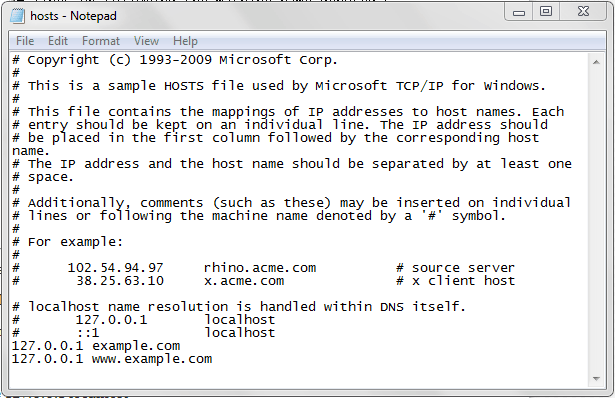
  3. Now just add any website at the bottom of this file with below prefix.127.0.0.1 example.com
    127.0.0.1 www.example.com
  4. Now make sure you add 127.0.0.1 in front of your website else it will not work.
  5. Now you can add as many websites you want, or blocking some specific hardcore websites would be the perfect option.
hosts-file-windows

#3. Blocking Porn Websites using DNS

Recently I have posted a simple tutorial on how you can block Porn and all those adult websites automatically by just changing out your DNS, so its pretty helpful for all those parents seeking out a for a solution and that too simple. [Check Here]

Receive Free Updates