Wednesday, May 9, 2012

How to Run Symbian Applications on Windows PC


Nokia Symbian SDKIf you own a Nokia Symbian phone and you want to use its application on PC than you can do that using the official emulator provided by Nokia for Windows PC. Well it’s a simple emulator with a normal graphical interface which you can use to run your Symbian applications on PC. So now any game or any entertainment app fro Symbian device can be used on PC, so follow steps below on how to use it on PC.

Steps to Install Nokia Symbian SDK On PC :


1. Download Nokia Symbian SDK from Official Website.
2. After you have downloaded the above software just install it on your PC using the normal steps. After successful installation just reboot your PC.
3. Now just navigate to Start > Program files > Nokia Developer Tools > Symbian SDK > Emulator and your Emulator will be launched.

4. Now your Emulator will look something like on the image on the right, just click on File > Open and choose your Symbian Application you wanna fire up.
5. Now your application will be loaded, use it play with it and have fun.

x

Transform Windows 7 into Mac OSX Mountain Lion Skin


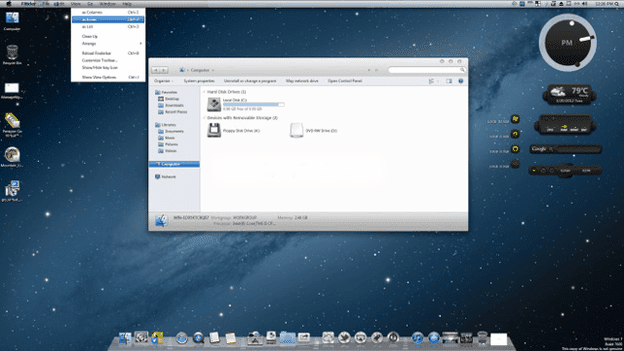
Skin packs are used to give a bright and unique look to your old and bored Windows interface, applying any transformation pack will simply update your wallpaper, change icons, sounds and adding a nice graphical user interface. We have already posted many themes and skin packs for Windows 7 which you can check out. Well today we are providing another Mac OSX Mountain Lion Skin Pack for Windows 7 which will blow your desktop with HD pixels graphics.
mac osx mountain lion
Well you can download this skin pack in two different version 64 bit and 32 bit, so you can check out and download it from below. Installing this skin pack is really simply you just have to download and double click on it to start the setup procedure, after that follow the instructions in the setup and click next as mentioned at last click on install and let it modify all the elements of your PC with its own, make sure to reboot your PC after installation is completed.

Download Mac OSX Mountain Lion Skin Pack :

Scan Product Keys for Software's with Product Key Reader


Product Key Reader is a software than will scan your computer for product keys of installed software's that can be used for backing them up for future use, so now you do not need to afraid of loosing any keys because you have this amazing tool for scanning them up for you anytime.
Product Key Reader is available for free and can be used unlimited times for backup purpose, this free version supports almost 100+ software installed on your system and there is also a premium version which comes bundled with many premium features like supporting 3000+ software's.
produkt key reader
So for the full list of software's supported you can check out this page and you can download it for free from their official download page. Now just download it and scan for all the product keys and back them up so that if anytime you loose them you have a secure backup ready to get it on.

How to Remove Facebook Timeline using Chrome Ext.


Facebook introduced Timeline a way back and it was greeted in a nice manner by many Facebook freaks and we also many Timeline Goodies like creating awesome Facebook Timeline Covers well but there were some complications using it so many people wanted to remove it so that they can get back their original + official Facebook profile layout. So many tweaks were launched to get rid of Timeline but some worked some had some glitches in it so time goes on and now we have a nice, good and permanent solution to remove Facebook Timeline.
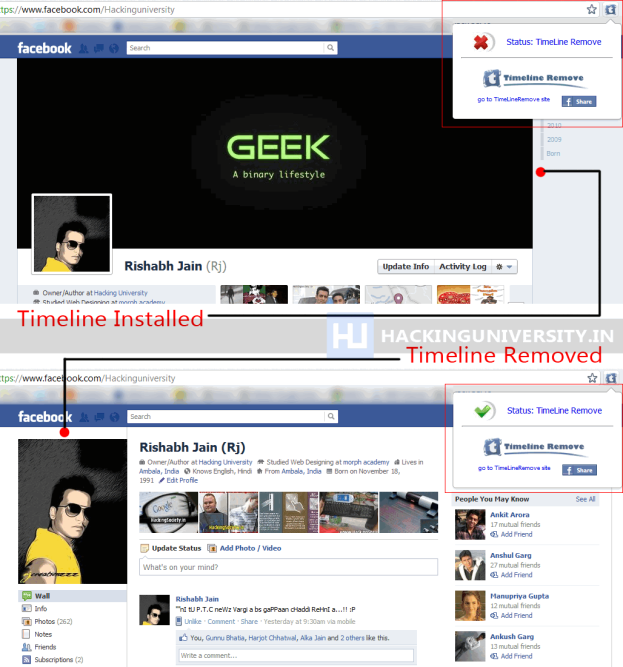
TimelineRemove chrome extension does your work instantly just by installing it, you install TimelineRemove extension and rest of the work is done by it automatically. So I just tried it out and here’s the below screenshot I captured with TimelineRemove Off state and than On state. So yes you also get option to switch Timeline back on and Off anytime you want.
Facebook TimelineRemove
So you can see in the above screenshot how this little worthy extension works, well if you are also fed up with your Timeline than you can grab this TimelineRemove Chrome Extensionand enjoy your Facebook experience without any Timeline junk.
Just install it and than visit Facebook.com and you will see that automatically your Timeline is removed but if you ever wanted to get back on it just click on this extension and than click on Status Timelineremove and if it turns into red cross that means your Timeline is back and when it is Green arrow than Timeline is disabled.

Download Timeline Remove for Firefox and Internet Explorer :

As you can see that extension works perfectly on chrome and removes your timeline profile but of you have Firefox or Internet Explorer instead of Chrome than you can download extension for Firefox and Internet Explorer well procedure is same and you will the same icon which you can click to enable or disable your Timeline Profile on your Facebook page.
Update : Thanks to Aqueel for letting me know that author has deleted this extension from Chrome Web Store, but now I have updated the links from their official website so now links are working good so have fun bye :)

TrickedOutTimelime Creates Freaky Facebook Timeline Covers


If you love to impress your Facebook friends or page fans than you know that you have a way to post a nice image on your timeline and than people can enjoy that image. We have also posted earlier a good online website that helps you in creating nice timeline covers for Facebook. But today we found another awesome website which can take your covers to the next level by giving a freaky touch to it. Well many professionals have already created covers like these and now you can also create some covers like below and impress your friends.
trickedouttimeline-demo
TrickedOutTimeline is a online trick covers creating website which I just discovered right now and enjoyed creating my first cover on it and thought that I should share the whole bunch of procedure for creating your own timeline covers. With TrickedOutTimeline you can give your profile a zoom effect, a mosaic old touch, merge two images together and create some awesome result and lots more.

How to make Tricky Timeline Cover :

trickedouttimeline-effects-layout
1. Visit TrickedOutTimeline.com and click on any one of the above layout’s given on their website. (I tried the zoomable one and output was awesome.)
trickedouttimeline-upload-image
2. Now you will be taken to the image uploading option, from where you can upload an image from your computer or choose the current Facebook profile proto by signing in.
cover-image-preview
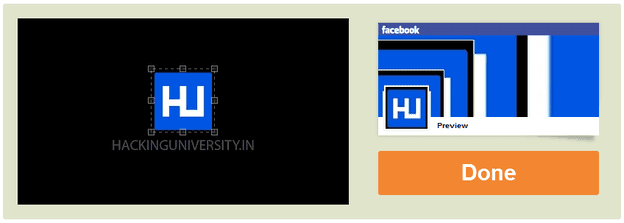
3. Now just adjust the selection on the image for what part you need and check the preview rendering on the right, when satisfied with the preview just click on the Done option.
4. Now your image will be precessed and you will get a option to like their page before you can download your images, just like their page and you will get image downloading options like below.
download-cover-image
5. Download both the images Cover and Profile, now just login to your Facebook account and than click on change profile and change cover and upload the ones you have downloaded from this website.
Voila ! Enjoy these new tricky and freaky timeline covers for your Facebook, now its time to share your profile with your friends and impress them up, make sure to like this post if you got benefited from it.

Receive Free Updates